Restaurant QR Codes: Verify Menus and Payment Links
Table of contents
Quick answer
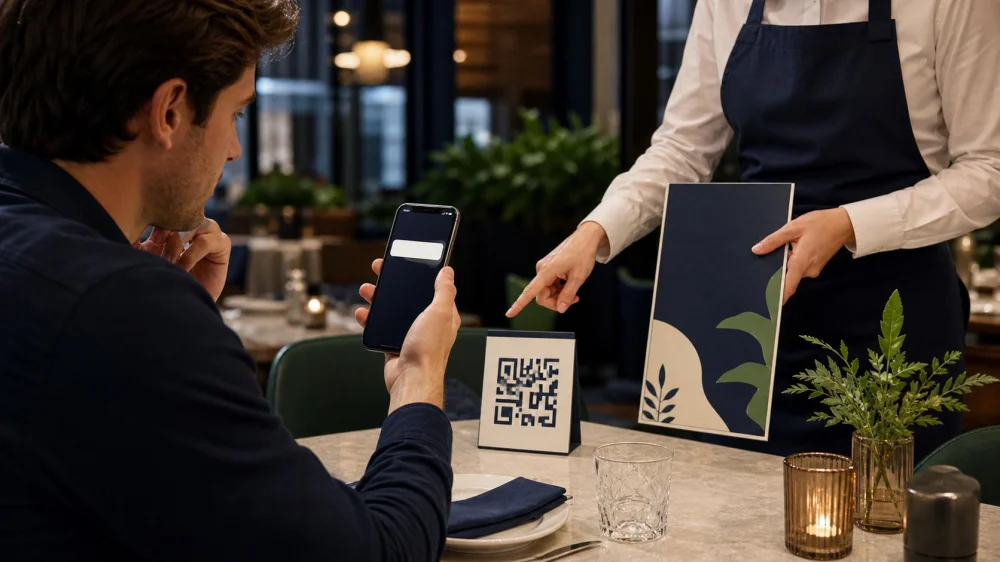
Before scanning, check that the code belongs to the restaurant and is not a sticker placed over another code. Preview the destination and look for misspellings, switched letters, or an unfamiliar domain. For payment, confirm the process and amount with staff before entering card details. If anything feels wrong, close the page and use a printed menu, the restaurant's verified website, or a staff-assisted payment method.
Inspect the physical code before scanning
A QR code may appear on a table tent, menu cover, receipt, check presenter, window, or server device. Look at the surrounding card and the code itself. A raised edge, mismatched print quality, crooked sticker, damaged seal, or code covering another label deserves a pause.
Ask the server, “Is this the restaurant's current menu code?” A code left on an outdoor poster, loose card, or unattended table is easier for someone to alter than a link delivered through the restaurant's verified website. Do not scan a code handed to you by an unrelated person or sent in an unexpected message merely because you are dining nearby.
375º Chicken 'n Fries / 375 chicken n fries
New YorkNew York CountyNew York
12 E 125th St, New York, NY 10035, USA
Preview and read the destination
Use the phone's built-in preview instead of opening immediately. Read the visible destination from beginning to end. The U.S. Federal Trade Commission advises checking for spoofing such as a misspelling or switched letter. Be cautious when the preview hides the destination behind an unfamiliar link shortener.
A secure connection indicator is useful but does not prove the site belongs to the restaurant. Fraudulent sites can use encrypted connections too. Compare the domain with the address on the restaurant's official website, reservation confirmation, or printed receipt. When uncertain, type the known address yourself.
Verify a digital menu
A menu page should not need a banking login, government ID, account verification code, phone-management profile, or unrelated file download. If the code opens an app-store listing, asks to install software, or displays an urgent security warning, stop and ask for another menu.
Check that the restaurant name, location, current meal period, and prices make sense, but remember that a convincing copy can imitate those details. Confirm unusual deposits, “unlock menu” charges, or requests for personal data with staff. A printed menu or server explanation should remain available when a guest cannot or does not want to use a phone.
Use extra care with payment links
- Ask whether the restaurant actually uses QR payment and which bill or table the code represents.
- Compare the displayed merchant, items, subtotal, fees, tax, tip, and total with the physical check.
- Confirm the destination domain before entering card or wallet information.
- Do not share a one-time bank or account verification code with staff or a caller.
- Wait for a clear paid confirmation and ask for a receipt.
Do not pay a surprise request through cryptocurrency, gift card, wire transfer, or a payment account unrelated to the restaurant. If the page says the first payment failed, check your bank or wallet before trying again so you do not create a duplicate charge.
Reject unnecessary app and phone permissions
A menu site may reasonably need internet access; it should not need contacts, microphone, device-management, remote access, or permission to install a configuration profile. Location can be useful for selecting a branch, but you can usually choose the location manually.
Keep the phone's operating system and browser updated. Close pop-ups that claim a virus was detected or demand an immediate download. Do not copy commands from a webpage into system settings or another app. Ask the restaurant for a non-digital option.
Respond if you scanned or paid through the wrong link
If you only opened a suspicious page, close it and do not download, sign in, or grant permissions. Remove an unfamiliar downloaded file or app only through the device maker's official instructions. Change a reused password from a trusted device and enable multifactor authentication if you entered login credentials.
If you entered card or bank information or sent money, contact the financial institution through the number on the card or official app immediately. Ask about blocking or replacing the card, disputing the charge, and monitoring the account. Save screenshots, the destination, time, amount, receipt, and how the code appeared. Tell restaurant management so it can inspect other codes, and report fraud to the appropriate consumer or law-enforcement channel.
Restaurant QR safety checklist
- The code is on a current restaurant-controlled surface or document.
- No sticker, damage, or print mismatch suggests replacement.
- The destination preview matches the verified restaurant domain.
- The page does not demand an app, login, or unrelated permission for a menu.
- Staff confirm the QR payment method and bill amount.
- The merchant, total, fees, and tip are reviewed before authorization.
- No one receives a verification code or account password.
- A receipt and payment confirmation are saved.
Limits and financial cautions
This article provides general consumer cybersecurity information, not legal, banking, or device-repair advice. Restaurant systems, payment processors, phone interfaces, dispute rights, and fraud-reporting deadlines vary. A visual inspection cannot guarantee that a code or website is safe.
Contact your financial institution promptly after suspected fraud; do not wait for the restaurant to investigate first. Use official phone numbers and typed addresses, not contact details from the suspicious page. For a compromised work phone or account, notify the appropriate employer security team.
Frequently asked questions
Is every restaurant QR code risky?
No. QR codes are a convenient way to open links. The risk comes from not seeing the destination until scanning and from altered or fraudulent codes, so verify before proceeding.
Does “https” mean the payment page is legitimate?
No. It means the connection is encrypted, but a scam site can also use encryption. Confirm the exact domain and restaurant payment process.
What if my phone opens the link automatically?
Close it if the destination is unfamiliar. Review camera or scanner settings for link previews, and use the restaurant's verified website or printed menu.
Should I scan a QR code sent by text after dinner?
Treat an unexpected message cautiously. Contact the restaurant using a number or website you already know is real rather than using the message's link or contact details.
Cybersecurity and consumer sources
- U.S. Federal Trade Commission: Scammers Hide Harmful Links in QR Codes
- FBI: Building a Digital Defense Against QR Code Scams
- The restaurant's verified official website, on-site manager, physical check, and named payment provider are the primary sources for a specific transaction.
Conclusion and next steps
Use a QR code as a pointer, not proof. Inspect the card, preview the destination, compare it with a known restaurant domain, and slow down before payment or permissions. When the link cannot be verified in a few seconds, ask for a printed menu or another way to pay.



 Sabor Dominicano4.0 (103 reviews)
 Dunkin'3.0 (197 reviews)
 Sushi King4.0 (174 reviews)
 CakeBurgers4.0 (261 reviews)
 Fred's Meat & Bread by Wonder2.0 (28 reviews)
 Auntie Anne's4.0 (5 reviews)
 The Best Food and Wine Pairings at Restaurants Near Me: Expert Tips for a Perfect Match
 How Ice Cream Shops Are Using Seasonal Ingredients to Stand Out
 Best Middle Eastern Restaurants for Seasonal Specials and Unique Flavors
 Discovering French Restaurants That Offer Authentic Regional Cuisine
 Best Taco Bars Near Me: Where to Get the Most Flavorful Tacos in Town
 Best Local Wine Bars Near Me: Sip Local Wines in Great Atmospheres